RoboForm has an internal backup engine, and a while back I posted a small tutorial on how to back up RoboForm data. Now, the backup works quite fast and it's easy to do, but if you want to synchronize your RoboForm data between your computer and your laptop, this can get a bit tricky if you don't use their other program, Goodsync. Since Goodsync isn't free, I decided to look around for a solution and I've found one. You can read and comment on this tutorial here: Synchronizing RoboForm data.
11/01/2008
9/22/2008
RoboForm 6.9.91 released
RoboForm 6.9.91 was released, however this is a minor update with a couple of small fixes (no Chrome support news yet). You can discuss this new release here: RoboForm 6.9.91 released.
9/16/2008
RoboForm Forum (unofficial)
Google Chrome is my newest love, RoboForm an old one. Because of this, I have recently launched http://www.roboformchrome.com, an unofficial discussion forum for RoboForm and Google Chrome (porting this way this RoboForm blog from the Blogger address to blog.roboformchrome.com). I welcome anyone wanting to ask a question, post a tutorial or simply send some feedback regarding these great (RoboForm) or almost great (Google Chrome) programs. You can access the forums here: RoboForm Forum and Google Chrome Forum.
The step for Google Chrome from an "almost great" to a "great" browser hangs in the compatibility with RoboForm - if they add that, I'll make it my default browser. Until then, Maxthon2 remains my most web productive option.
The step for Google Chrome from an "almost great" to a "great" browser hangs in the compatibility with RoboForm - if they add that, I'll make it my default browser. Until then, Maxthon2 remains my most web productive option.
9/03/2008
RoboForm for Google Chrome
Update 4: Support for Google chrome will be added by the end of 2009 according to this http://www.roboformchrome.com/topic/google-chrome-support-on-the-way

Google's newly released Chrome browser is fast but (very) lightweight. The first thing I thought of when trying it was if RoboForm will seemingly integrate with it (a RoboForm toolbar like in FireFox for instance). So since there was no mention on their news page of a new version, I wanted to open a support ticket, but that's when I've seen this:

We are sorry, but RoboForm cannot integrate with Google Chrome.
Unfortunately, it is not possible due to the browser engine that Google chose, named WebKit.
We will look into possibility of integration.
So, I really hope they'll find a solution. The reason I didn't use Opera is because RoboForm doesn't integrate with it, I would hate to have to do the same thing with Google Chrome. Anyway, I still hope they're still figuring out things, I mean it took a while until they've released the RoboForm for FireFox version.
Update: There is an (inconvenient) workaround on using RoboForm with Google Chrome. If Google Chrome is set as the default browser, and RoboForm's tray icon is enabled, you can right-click the tray and select the passcard you want to fill in. This way that page will be automatically opened in Chrome and the password filled-in (and submitted, depending on your options). However, this won't work with filling forms in Chrome, just with filling passwords. Anyway, as mentioned above it's an inconvenient workaround, so you RoboForm guys from Siber need to really find a solution to have a "RoboForm Chrome" package (and I hope they are working on RoboForm for Mac too, there was a rumor a while back that they were searching for Mac developers, but nothing new yet).
I see someone asked how to make RoboForm not only open the page where the passcard needs filled-in, but also to submit it. So, in order to have "Fill & Submit" as a default option you have to go into RoboForm Options - AutoFill tab and check "Fill & Submit" is the default action for Matching Passcards.
I stand corrected, this workaround does work only to open the desired page in Google Chrome, but it doesn't fill and submit (at least not in this current version).

Update 2: A small prediction I have, Siber Systems will create for sure a solution for Google Chrome because it's going to be too popular to ignore. But, this new integration will probably be available only in RoboForm 7. Why I'm saying this? Well the last major version of RoboForm (6.0) was released exactly 4 years ago, and since then all registered customers had free upgrades. But now they're at 6.9.90 and it seems about time to release version 7 - and what a better incentive to upgrade than a unique integration with Google Chrome. Plus, in this situation Google's to blame too - they've released this Chrome version without sending private betas to some important developers on the browser market first, as other developers do.
Update 3: I've launched a new website, http://www.roboformchrome.com, a discussion forum for RoboForm (an old love) and Google Chrome (the new "mistress"), and I invite anyone willing to vote on a RoboForm for Chrome poll here - http://www.roboformchrome.com/topic/roboform-for-google-chrome - hope it will gather enough buzz to obtain (another) official response on this matter.
7/25/2008
Funny RoboForm error
This error is easy to reproduce if you're using Maxthon2. Simply try to edit something in the identities and after that when Maxthon guardian asks you if you want to allow the change select Deny. Then, RoboForm will say:

What's funny is that if you "translate" what the error says you understand that the error occurred because the operation completed successfully. I have to admit that last part looks like a Windows error ...
7/10/2008
New RoboForm coupon code
WinZIP sent today a newsletter to subscribers with an offer for 20% off for RoboForm Pro. The coupon code is valid for a "limited time", as they say "But hurry… this offer is exclusive to WinZIP valued customers and is only valid through July 2008". So if you haven't ordered it already, now would be a good time to get it discounted. Simply click on this link to see the promotion: RoboForm discount.
If the RoboForm promotion is still available, you should the discount applied just like in the screenshot below (the total costing $23.95 instead of the full price $29.95):

As you can see in the Discount Code field, the coupon code for RoboForm for the 20% discount is WZIP1.
7/01/2008
RoboForm 6.9.90 supports FireFox 3 (final release)
I was expecting a release news for RoboForm 7, but it seems they're not there yet (wonder if after 6.9.99 they'll go to 6.9.991). No complaints here though, given that you can get the update for free if you're a registered user. The main improvement they did in this version is the support for FireFox 3, the new version of Mozilla's IE killer. The new version can be downloaded here: RoboForm 6.9.90 and RoboForm2Go 6.9.90
What's new in RoboForm 6.9.90:
- NEW: RoboForm now fully supports FireFox 3 (the final release not the betas)
- NEW: They've added Enterprise policies
- UPDATE: When installing RoboForm you can choose to activate the Pro edition
- FIX: resized some controls in the Save dialog
- FIX: in FireFox 3 they've fixed a bug in localized context menus
- FIX: RoboForm cannot be used with FireFox 3 beta versions anymore
5/21/2008
RoboForm 6.9.89 released
They're getting close to releasing RoboForm 7, and I must say they're fast in releasing updates. FireFox 3 RC1 was released 2 days ago and they already have RoboForm compatible with that. The new version can be downloaded here: RoboForm 6.9.89 and RoboForm2Go 6.9.89.
Changes in this update:
- RoboForm 6.9.89 now supports FireFox 3.0 RC1.
- Added warning about Skype IE Addon that causes problems in RF Pro activation and general browsing.
- When doing Copy Home, RoboForm offers to overwrite or rename if such identity already exists.
- Added Turkish localization for RoboForm.
- Fixed: Unload Portable in IE Protected Mode on Vista.
- Fixed: Logoff on User Switch on Vista.
- Fixed: RoboForm did not fill any form fields message during activating RoboForm Pro.
- Fixed: decoding of some Japanese URLs.
- Fixed: RoboForm2Go disconnects from browser sequence, it was causing freezes.
- Fixed: Matching Passcards mini-dialog takes focus when uses you mouse over it.
- Fixed: error in mousing over identity protected by dual password.
- Fixed: In FireFox, RoboForm will not connect to Google sidebar.
- Fixed: In FireFox RoboForm will not attach to FireFox Master Password dialog.
- Fixed: In FireFox, RoboForm will not use rfmozhlp.dll anymore because FireFox 3 crashes on it.
5/13/2008
Using RoboForm with mobile devices
RoboForm can be used with mobile devices too, so you can really have your passwords, safenotes and identities everywhere you go. To use RoboForm on a mobile device you have to own a RoboForm license already ($29.99 or you can use a RoboForm discount), and also (in some cases) to purchase and additional plugin (that costs $9.99). RoboForm versions for mobile devices: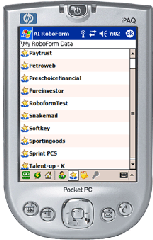
- RoboForm for Palm - this mobile password manager plugin costs additional $9.99
- RoboForm for Windows Mobile - the plugin is free because is currently in beta
- RoboForm for Symbian - this plugin is free
Beside these plugins for mobile devices, RoboForm also offers versions that runs on USB devices (RoboForm2Go), and another portable version that only works with U3 enabled USB devices (RoboForm2Go For U3).
5/02/2008
RoboForm for Mac?
No, not yet here. RoboForm for Mac will be released somewhere in the future, but the date is not mentioned. Why I'm saying it will be a RoboForm for Mac in the future? Because on their Careers page they mention this opening (for a while now, that's true):
So this means they acknowledged that there's a market for a future RoboForm for Mac and they will make it happen. The only thing that works for Mac is the RoboForm2Go USB key, so it means that the USB flash drive will work on Mac but the RoboForm2Go software will not work - kind of beats the purpose to purchase the USB key if the portable roboform for Mac doesn't work.
Anyway, if you're tired waiting for a RoboForm for Mac version, you could use a different product. I've heard good things about 1Passwd, a password manager for Mac, and here are some details that might be of interest if you are interested in switching to it until RoboForm for Mac is available:
Senior Mac Developer
Your goal will be to port RoboForm to Mac, so knowledge of all involved technologies is required.
Must have experience in large C++ software projects on Mac, preferably involving browser integration.
Requirements: Mac OS GUI, APIs, UI design, browser internals, C++, object-oriented programming.
So this means they acknowledged that there's a market for a future RoboForm for Mac and they will make it happen. The only thing that works for Mac is the RoboForm2Go USB key, so it means that the USB flash drive will work on Mac but the RoboForm2Go software will not work - kind of beats the purpose to purchase the USB key if the portable roboform for Mac doesn't work.
Anyway, if you're tired waiting for a RoboForm for Mac version, you could use a different product. I've heard good things about 1Passwd, a password manager for Mac, and here are some details that might be of interest if you are interested in switching to it until RoboForm for Mac is available:
- Integrated with Safari, OmniWeb, DEVONagent, Firefox, Camino, and Flock.
- You can import the RoboForm Passcards and Safe Notes into 1Passwd.
- It costs $35.
Subscribe to:
Posts (Atom)

