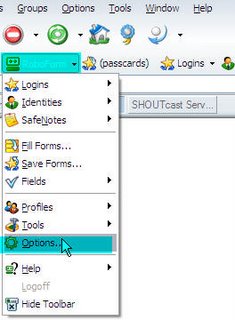
First step in backing up is opening the Options page. Either from the Robo Form tray icon or the RoboForm button in your browser toolbar, click on Options:
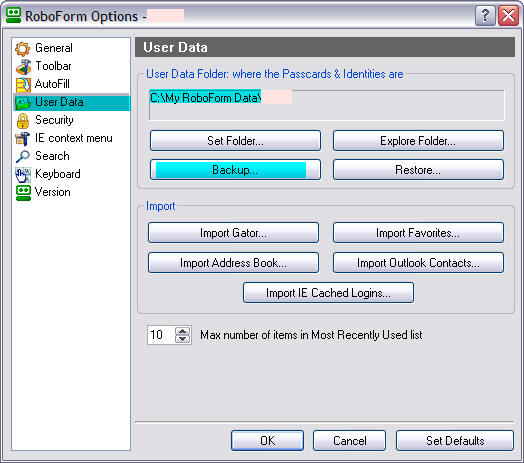
Once that Options window is opened, click on the User Data tab. From those buttons click on Backup... to start the backup wizard, just like you see below.
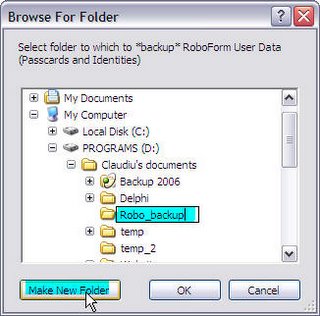
What will happen next is that you'll get a window to browse to a folder where you want to backup your data. For better handling just create a new folder and name it in a manner that will allow you to remember what it contains (for instance Robo_Form_backup_01012006). What Robo Form does is a mirror backup, meaning an exact copy of the data. It would be great if they would integrate incremental backup and automatic folder naming.
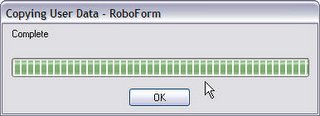
Once you click on the Ok button, you'll get a confirmation window asking you to confirm the files transfer. Click on Ok to start the actual backup process.

If everything went well you will get a Backup Complete message. Click Ok to close it.
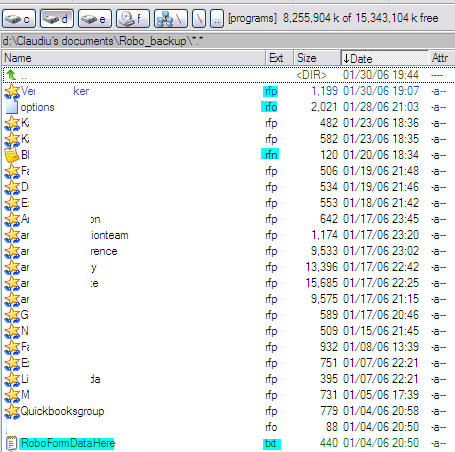
Of course the wisest thing would be to also manually check if everything went well and that you have your Robo Form data backed up. For that open Windows Explorer (or Total Commander) and go to the folder you created for this backup. You should see a list with files having the extensions: .rfp (roboform passcard), .rfn (roboform safenotes), .rft (roboform identities) and .rfo (roboform options files):
That's about it. If you have questions send an email to spuby2000@gmail.com and I'll try to answer it.
Download the latest version here (approx. 2MB): Robo Form 6.6.4
Download portable version of Robo Form from here: Pass 2 Go 6.6.4

